D&D Beyond Maps adds condition tracking with one sync caveat
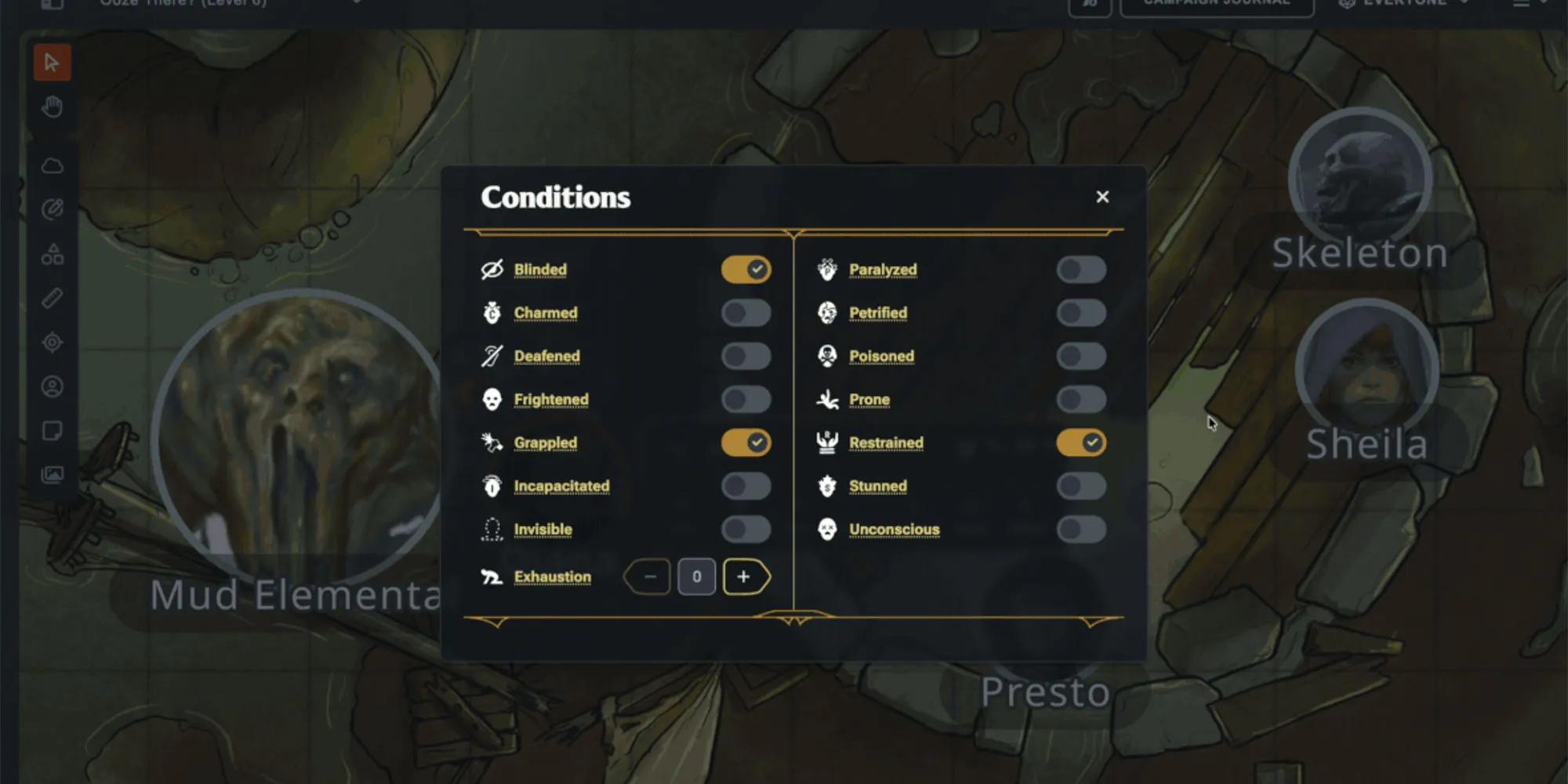
D&D Beyond Maps now lets Dungeon Masters put standard conditions directly on every token. The update gives groups a shared way to track effects such as Blinded, Grappled, and Prone without moving that work to a separate note, chat message, or pile of physical markers.
D&D Beyond's official feature announcement confirms that conditions can be applied from a token modal. Active effects appear as icons in the token context menu, and changes made on a character sheet can synchronize with the matching token in Maps. The official post also acknowledges a limitation on the old platform: a character-sheet refresh may sometimes be needed to force the update through.
What the update changes at the table
Condition tracking sounds like a small utility until an encounter has several creatures, concentration effects, and status changes moving at once. A condition can alter movement, attacks, defenses, or available actions. Losing track of one effect can change the outcome of a turn and lead to an argument several minutes later.
The new token menu keeps that information close to the creature it affects. A DM can check the board instead of rebuilding the combat state from memory. Players can also see the icons, which makes the encounter easier to follow when several turns pass between their actions.
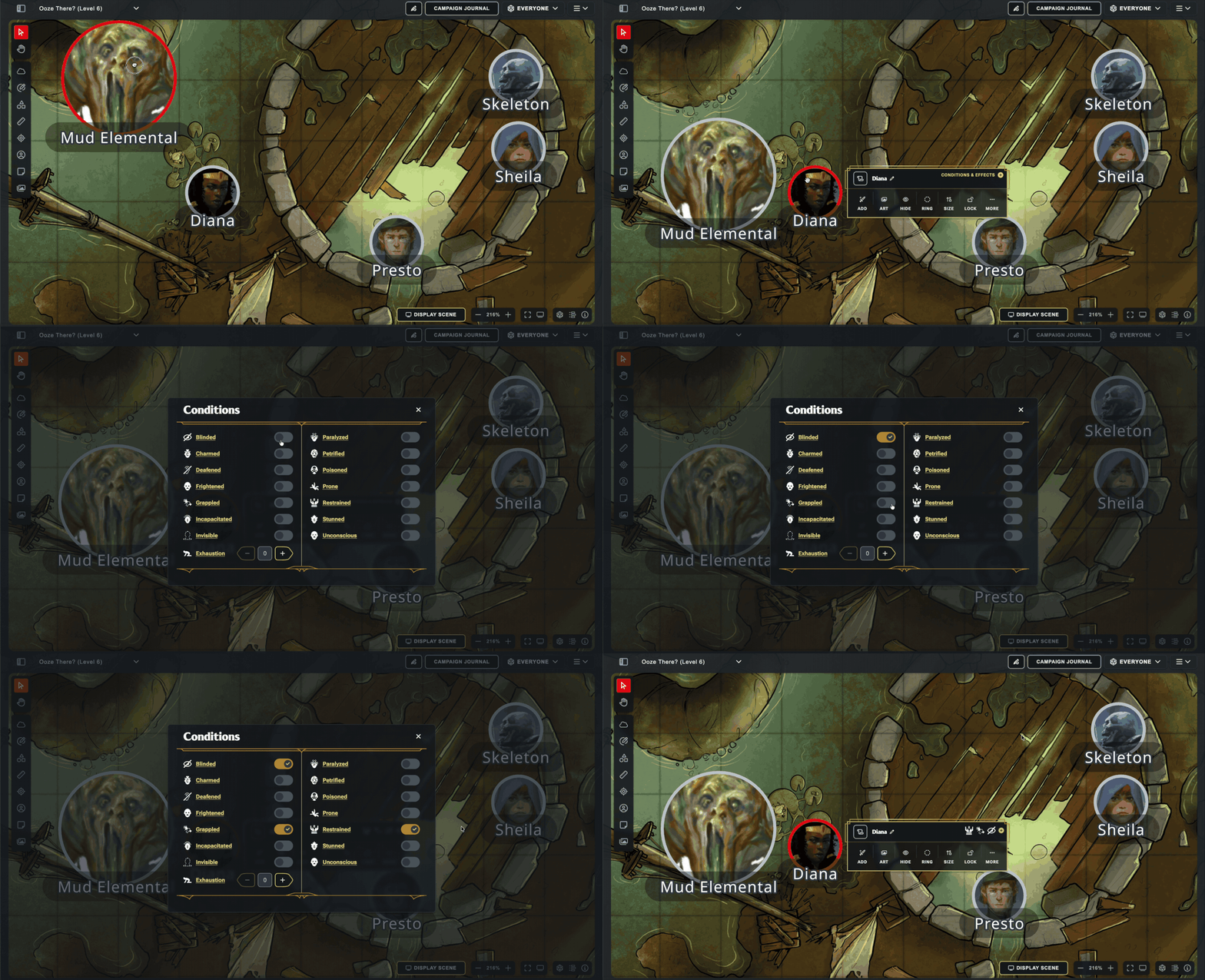
That shared visibility matters for online family games and groups with newer players. The DM still controls the state of the encounter, yet the rest of the table has a visible reminder of what is happening. A player does not need to remember a spoken update from ten minutes earlier to know that a creature is Prone.
The synchronization caveat is real
The character-sheet connection is the most useful part of the feature and the part that needs the clearest expectation. D&D Beyond says conditions can synchronize between sheets and Maps. It also says users on the old platform may need to refresh a sheet when the update does not appear immediately. The company says that limitation will be addressed.
Until then, groups should keep a simple verification habit. When a condition changes on a sheet, check the token before the next relevant roll. If the icon is missing, refresh the sheet and confirm again. That is still less work than maintaining two unrelated condition lists, but it is not fully hands-off.
The accepted sources also do not establish support for custom, user-defined conditions. Tables that rely on homebrew statuses, campaign-specific injuries, or unusual environmental effects should assume they still need a separate tracking method unless D&D Beyond documents otherwise.
Independent reporting sees a useful quality-of-life gain
VICE's independent report describes the feature as especially helpful during complicated combat. The outlet points to the shared token-menu visibility and keeps the refresh warning in view. It also places condition tracking within a more active run of Maps development during 2026.
That outside assessment adds practical context to the official feature list. D&D Beyond explains what the controls do. VICE explains why the controls matter once an encounter becomes crowded. Together, the sources support a measured conclusion: condition tracking removes a common bookkeeping burden, though the current synchronization path still needs occasional attention.
What families and campaign groups should do
Groups already using Maps can test the feature during a low-stakes encounter before depending on it for a boss fight. Apply several standard conditions, change one from a character sheet, and see whether every participant can read the board clearly. That quick trial will expose any refresh friction before it matters.
Dungeon Masters should also decide where unsupported effects live. Standard conditions can stay on the token. Custom campaign effects can remain in the session notes or another shared tracker. A clear split prevents the new tool from creating false confidence that every rule state is represented on the map.
For parents running games with younger players, visible icons can support learning. The icon becomes a prompt to ask what Grappled or Prone changes, giving the player a chance to connect a rule with the situation on screen. The tool should help the table understand the game, not replace that conversation.
D&D Beyond Maps has solved a real piece of combat friction. The update is most valuable when groups treat it as a shared display backed by a quick human check. Use the standard conditions, verify sheet synchronization when it matters, and keep custom effects somewhere everyone can find them.
Continue exploring TTRPGs coverage from Crosspad Gaming.